# Install and set up the MonoCloud Next.js SDK (/docs/sdks/nextjs/installation)
This guide shows how to install the MonoCloud Next.js SDK and connect your Next.js application with MonoCloud authentication.
By the end of this guide, you will have:
- A MonoCloud application configured in the Dashboard
- The SDK installed in your Next.js project
- Authentication enabled across your application
## Sign up and configure MonoCloud [#sign-up-and-configure-monocloud]
> If you already have a MonoCloud account and Web App, skip ahead to [Install the MonoCloud Next.js SDK](#install-the-monocloud-nextjs-sdk).
### Create a MonoCloud account [#create-a-monocloud-account]
If you don’t have an account yet, sign up at: [https://www.monocloud.com](https://www.monocloud.com/api/auth/signin?prompt=create)
### Create a Web App [#create-a-web-app]
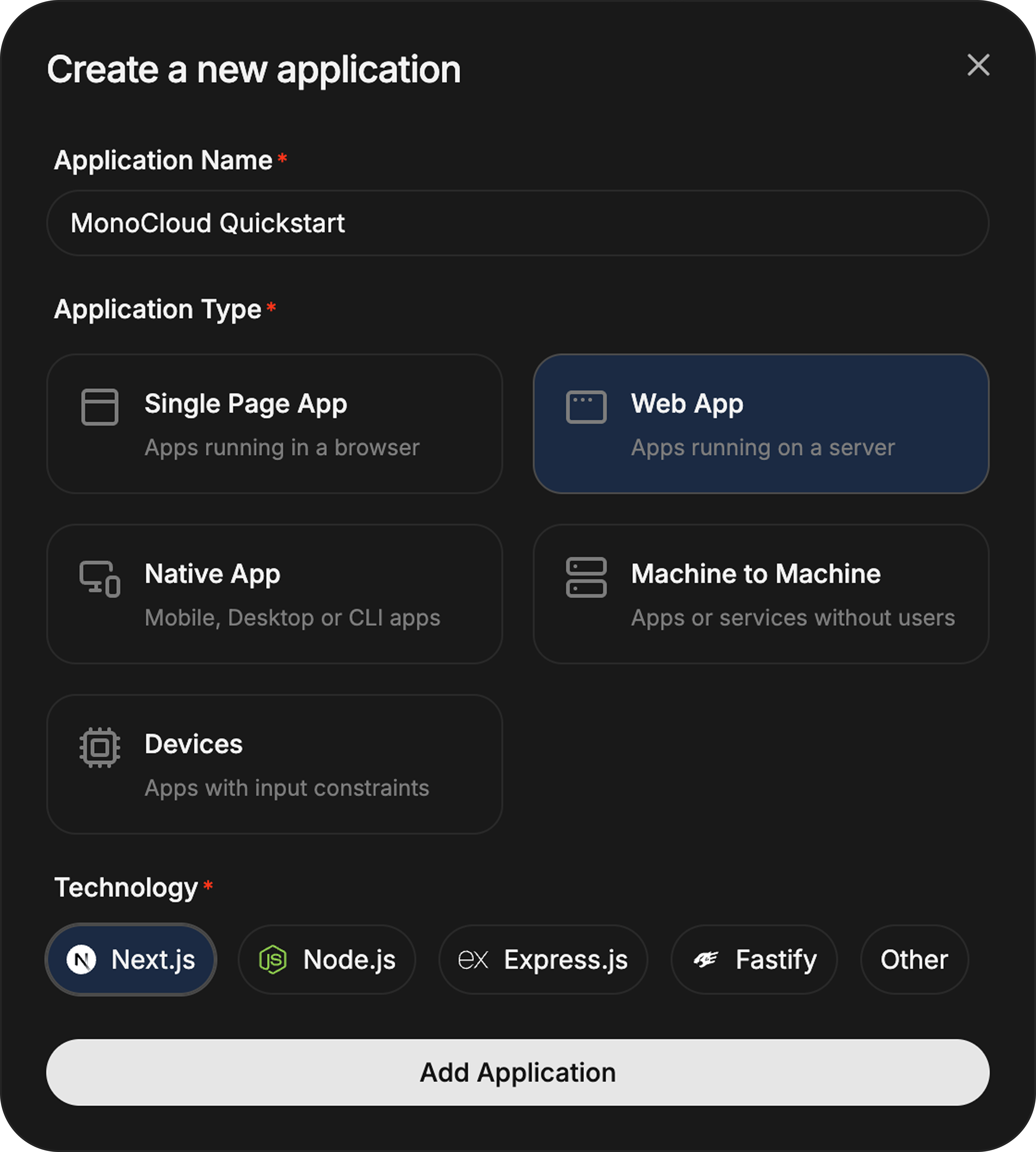
In the [MonoCloud Dashboard](https://dashboard.monocloud.com/):
1. Click **Add Application**
1. Select **Web App**
1. Choose **Next.js**
1. Create the application
Each Web App represents a single application secured by MonoCloud.
## Configuring your Web App [#configuring-your-web-app]
Open your Web App and configure the following URLs.
### Redirect URLs [#redirect-urls]
These URLs tell MonoCloud where to redirect users after authentication events.
For local development, configure:
- **Callback URLs:** `http://localhost:3000/api/auth/callback`
- **Sign-out URLs:** `http://localhost:3000`
> Replace these with your production URLs before deployment.
## Create your Next.js project [#create-your-nextjs-project]
If you already have a Next.js project, skip this step.
```npm title="Terminal"
npx create-next-app@latest
cd
```
Node.js 18 or later is recommended.
## Install the MonoCloud Next.js SDK [#install-the-monocloud-nextjs-sdk]
Install the SDK using your package manager:
```npm title="Terminal"
npm install @monocloud/auth-nextjs
```
## Configure environment variables [#configure-environment-variables]
See the [Environment Variables reference](https://monocloud.github.io/auth-js/interfaces/_monocloud_auth-node-core.index.MonoCloudOptions.html#environment-variables) for the full configuration list.
By default, the SDK is configured using environment variables (recommended). To configure the client programmatically, see [Advanced: Custom Client Configuration](#advanced-custom-client-configuration).
Create a `.env.local` file in your project root:
```bash title=".env.local"
MONOCLOUD_AUTH_TENANT_DOMAIN=https://
MONOCLOUD_AUTH_CLIENT_ID=
MONOCLOUD_AUTH_CLIENT_SECRET=
MONOCLOUD_AUTH_SCOPES=openid profile email
MONOCLOUD_AUTH_APP_URL=http://localhost:3000
MONOCLOUD_AUTH_COOKIE_SECRET=
```
### Where to find these values [#where-to-find-these-values]
| Environment variable | Where to find the value in MonoCloud |
| ------------------------------ | ----------------------------------------------------------------- |
| `MONOCLOUD_AUTH_TENANT_DOMAIN` | Domain from **Application Information** |
| `MONOCLOUD_AUTH_CLIENT_ID` | Client ID from **Application Information** |
| `MONOCLOUD_AUTH_CLIENT_SECRET` | The secret from the **Application Information** |
| `MONOCLOUD_AUTH_SCOPES` | Set to `openid profile email` |
| `MONOCLOUD_AUTH_APP_URL` | Base URL of your app (use `http://localhost:3000` in development) |
| `MONOCLOUD_AUTH_COOKIE_SECRET` | A random secret used to sign session cookies |
> Generate a cookie secret using: `openssl rand -hex 32`
Once these variables are set, authentication is automatically initialized — no additional configuration is required.
## Register the authentication middleware [#register-the-authentication-middleware]
The MonoCloud SDK exposes an `authMiddleware()` function that enables authentication and protects all routes matched by the middleware `matcher` configuration.
Create a `proxy.ts` file in the project root:
> If you are using Next.js 15 or earlier, name this file `middleware.ts` instead.
```tsx title="src/proxy.ts"
import { authMiddleware } from "@monocloud/auth-nextjs";
export default authMiddleware();
export const config = {
matcher: ["/((?!_next/static|_next/image|favicon.ico|sitemap.xml|robots.txt).*)"],
};
```
By default, every route matched by the middleware is protected. Use the `protectedRoutes` option to control which routes require authentication.
No additional setup is required — authentication works automatically once middleware is registered.
All SDK helpers (for example `getSession()`, `protectPage()`, and `protectApi()`) can now be imported directly from the package and work automatically.
## Advanced: Custom Client Configuration [#advanced-custom-client-configuration]
By default, the SDK exposes function exports (for example, `authMiddleware()`, `getSession()`, `getTokens()`) that work automatically using the default MonoCloud client configured from environment variables.
Create your own `MonoCloudNextClient` instance only when you need multiple configurations, dependency injection, or explicit control over initialization.
```tsx title="src/monocloud.ts"
import { MonoCloudNextClient } from "@monocloud/auth-nextjs";
export const monoCloud = new MonoCloudNextClient({
routes: {
signIn: '/custom-login',
}
});
```
After creating a custom client, call methods on that instance instead of importing the default helpers.
```tsx title="src/app/page.tsx"
import { monoCloud } from "@/monocloud";
export default async function Page() {
const session = await monoCloud.getSession();
if (!session) {
return <>Not signed in;
}
return <>Hello {session.user.name};
}
```
## Next steps [#next-steps]
Explore route protection and advanced patterns:
- App Router
- [Protect server components](/docs/sdks/nextjs/app-router/protect-server-components)
- [Protect client components](/docs/sdks/nextjs/app-router/protect-client-components)
- [Protect API routes](/docs/sdks/nextjs/app-router/protect-api-routes)
- [Protect server actions](/docs/sdks/nextjs/app-router/protect-server-actions)
- Pages Router
- [Protect server rendered pages](/docs/sdks/nextjs/page-router/protect-ssr-page)
- [Protect client rendered pages](/docs/sdks/nextjs/page-router/protect-csr-page)
- [Protect API routes](/docs/sdks/nextjs/page-router/protect-api-route)