OAuth for SaaS - What Every Developer & Tech Leader Needs to Know
If you're building a SaaS product today, OAuth isn't optional — it's foundational. It's the protocol behind "Sign in with Google," third-party integrations, API access control, and the secure service-to-service communication that holds modern platforms together.
Yet OAuth remains widely misunderstood. Teams confuse it with authentication, misuse its flows, or bolt it on as an afterthought, only to face security gaps and painful refactors later.
This guide cuts through the confusion. It explains what OAuth actually does, why SaaS platforms need it, which flows matter for which use cases, and the mistakes that trip up even experienced teams.
Why SaaS Applications Can't Avoid OAuth
A modern SaaS platform is rarely a single application. It's typically a constellation of components — a web dashboard, a mobile app, public APIs, third-party integrations, and a cluster of internal microservices — all needing access to shared resources like user data, billing records, and analytics.
The challenge: how do you let all of these components access the right data, for the right users, without passing around passwords or hardcoding secrets?
OAuth solves this by issuing tokens that represent delegated permissions. Instead of sharing credentials, an application receives a short-lived token that grants specific, limited access. The user stays in control. The credentials stay safe.
The Four Roles in Every OAuth Flow
OAuth defines four participants. Understanding who does what is the first step to implementing it correctly.
Resource Owner — the user who owns the data. In a SaaS context, this is your customer granting permission for an app to access their account.
Client — the application requesting access. This could be your web frontend, a mobile app, a CLI tool, or a third-party integration built on your API.
Authorization Server — the system that authenticates users, enforces permissions, and issues tokens. This is the engine of the whole flow. It handles consent screens, validates credentials, and decides what access to grant.
Resource Server — the API that holds protected data. It receives requests, validates the attached token's signature, expiration, audience, and scopes, and then either allows or rejects the request.
In practice, many SaaS teams run the authorization server as a managed service and distribute resource servers across their API landscape.
Access Tokens: The Core Mechanism
At the heart of OAuth is a simple idea: instead of giving an application a user's password, you give it a token.
That token represents a specific set of permissions, is scoped to a specific API, and expires after a defined period. The API receiving the token validates it and grants access accordingly.
Authorization: Bearer eyJhbGciOiJSUzI1NiIsInR5cCI6IkpXVCJ9...
This approach decouples authentication from authorization. The API doesn't need to know how the user signed in — it only needs to know that the token is valid and carries the right permissions.
Scopes: Fine-Grained Permission Control
Scopes define what a client application is allowed to do with a token.
A well-designed SaaS API uses granular scopes rather than broad, all-or-nothing permissions:
| Scope | What It Allows |
|---|---|
read:products | View the product catalog |
write:products | Create or update products |
read:invoices | View invoice data |
When a token arrives at your API, the resource server checks whether its scopes match the operation being requested. A token with read:products can't update anything — the request gets rejected.
This model lets SaaS platforms implement nuanced permission systems across multiple APIs without reinventing access control for each one.
OAuth vs. API Keys vs. Session Cookies
OAuth isn't the only way to secure access. Here's how it compares to the other common approaches:
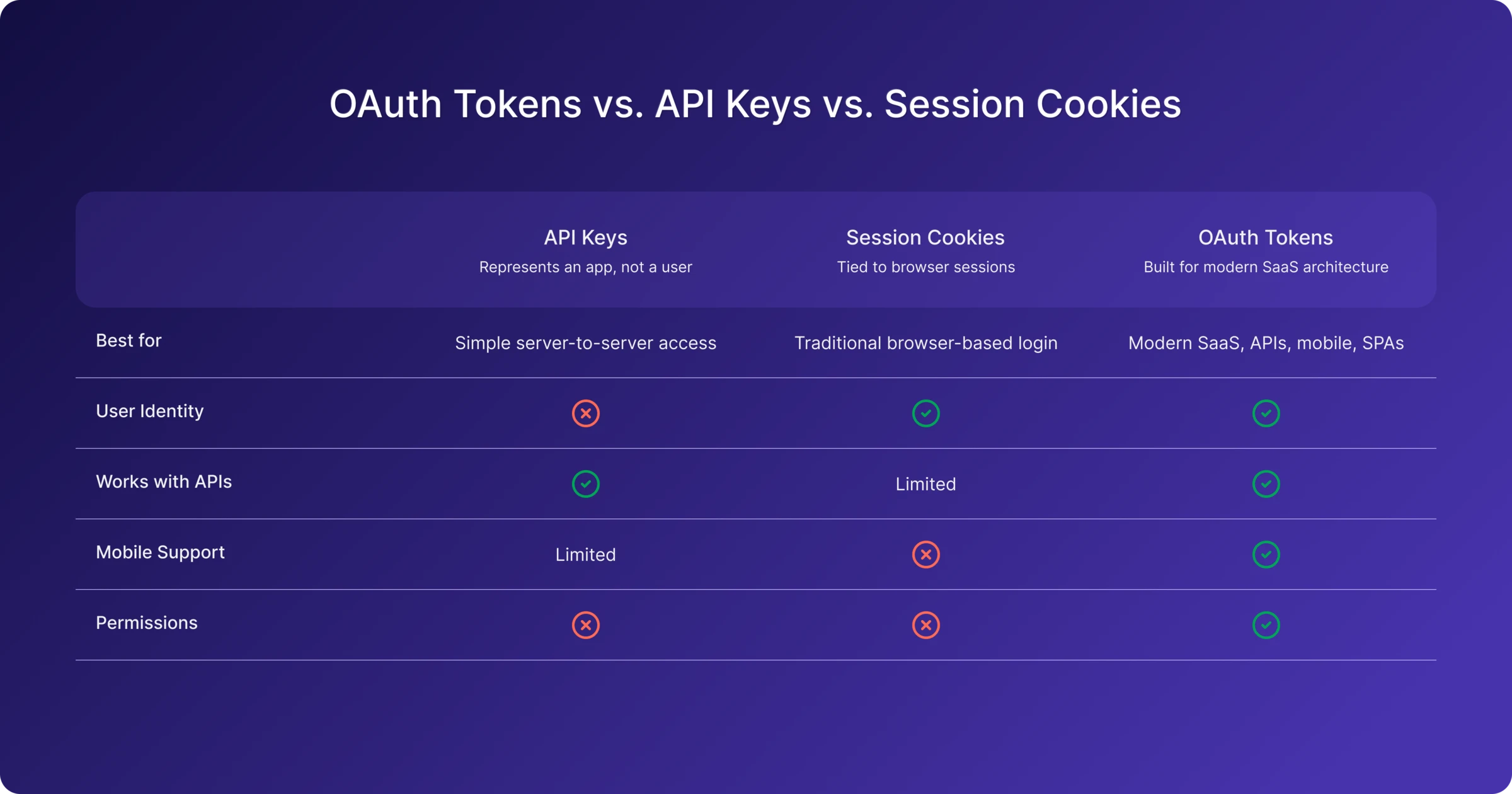
API keys are simple and useful for basic integrations, but they represent an application rather than a user, and offer no built-in permission model.
Session cookies work well for traditional web apps, but they're tied to browser sessions and don't translate to API-first architectures.
OAuth tokens are purpose-built for the kind of distributed, multi-client, API-driven systems that SaaS platforms actually are.
OAuth vs. OpenID Connect: Authorization vs. Authentication
One of the most common points of confusion: OAuth is not an authentication protocol. It's an authorization framework.
OAuth answers the question: "What is this application allowed to do?"
Authentication — proving who the user is — is handled by OpenID Connect (OIDC), which is a layer built on top of OAuth.
| OAuth | OIDC | |
|---|---|---|
| Purpose | Authorization | Authentication |
| Token | Access Token | ID Token |
| Answers | "What can this app do?" | "Who is this user?" |
Most SaaS platforms need both. OIDC handles user login and identity. OAuth handles API access and delegated permissions. Together, they form the standard identity and authorization stack for modern applications.
Choosing the Right OAuth Flow
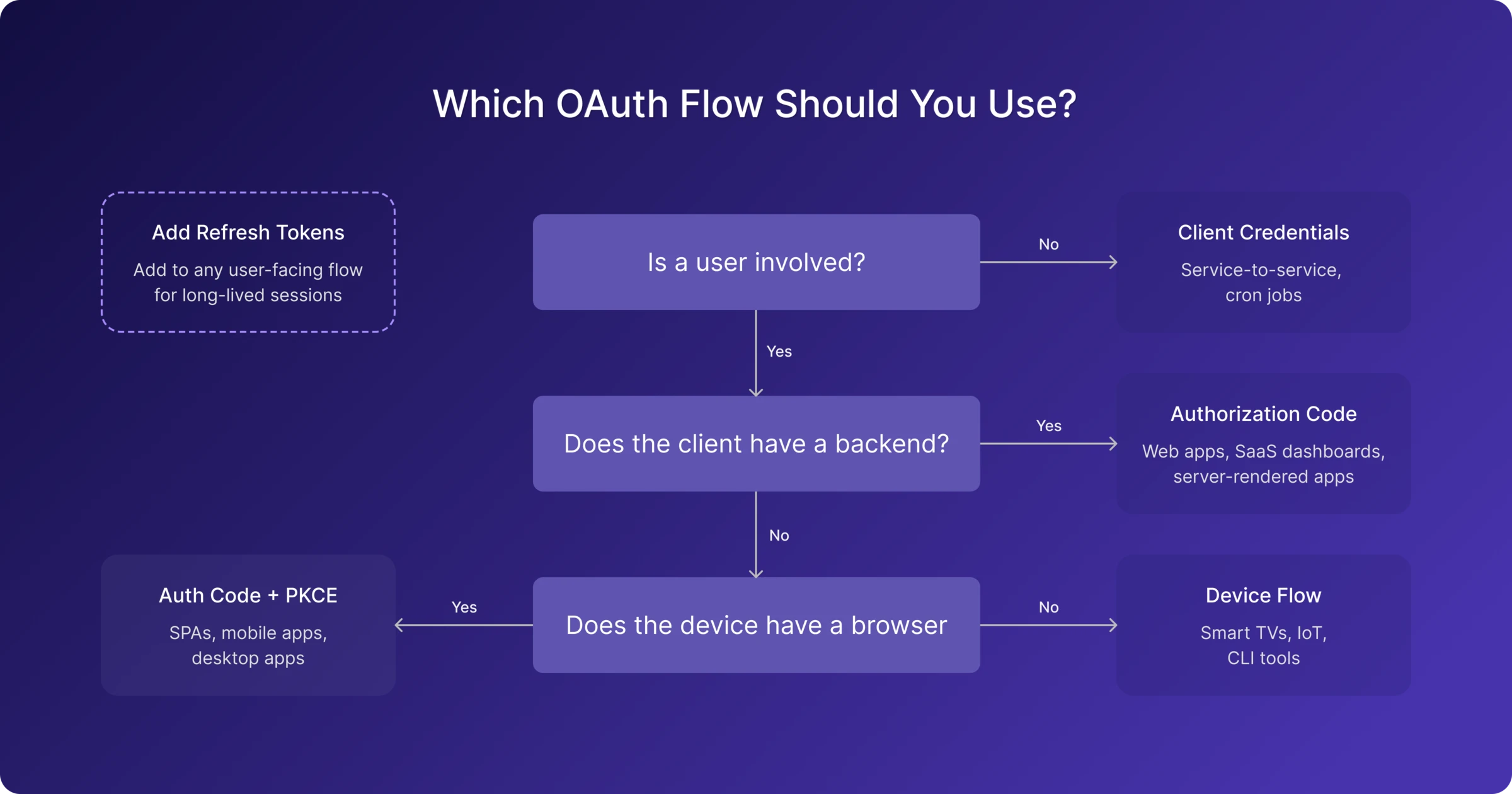
Different client types require different OAuth flows. The choice depends on where the client runs, whether it can securely store secrets, and whether a user is involved.
Authorization Code Flow
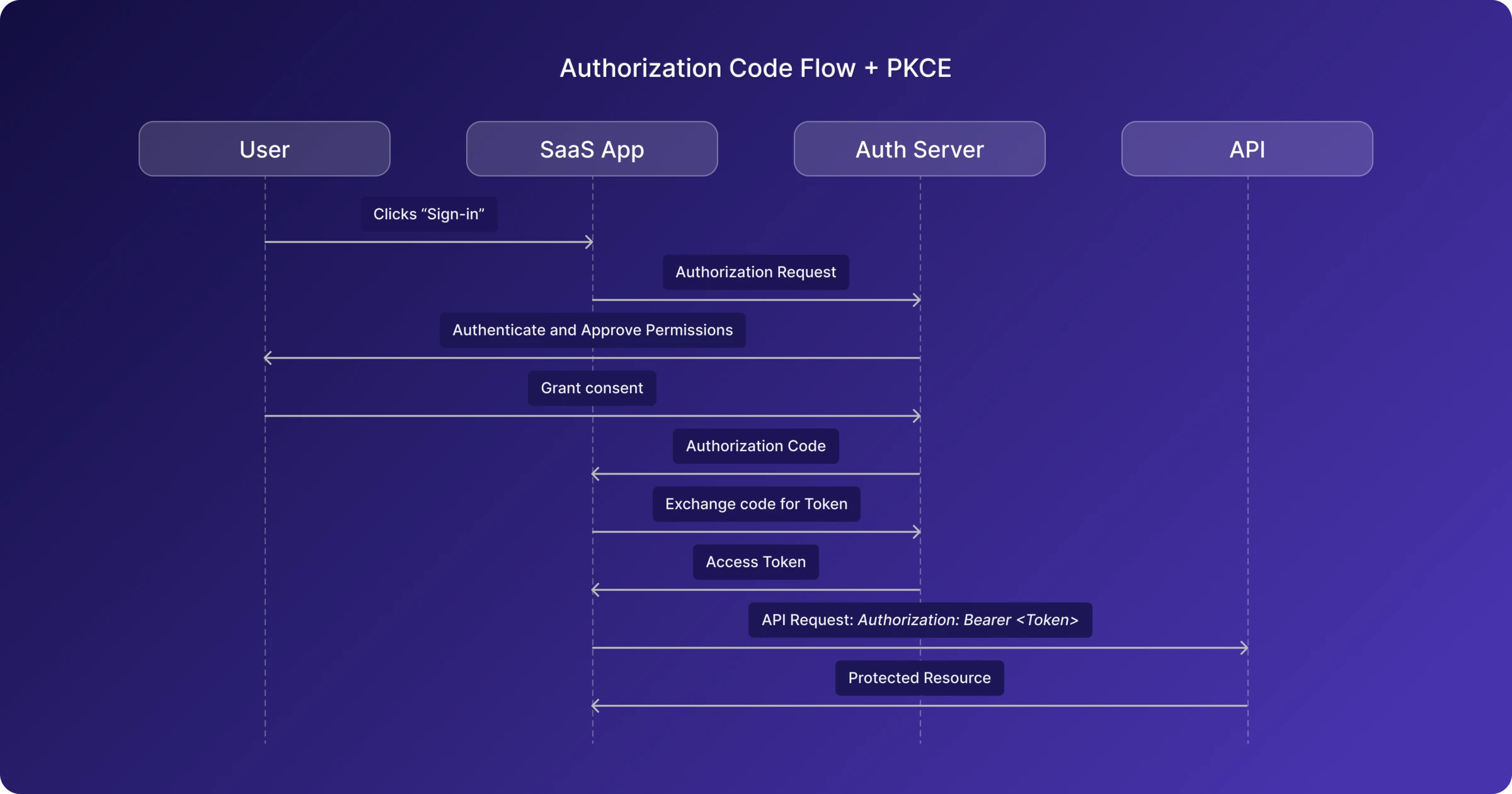
The gold standard for web applications. The client exchanges a short-lived authorization code for tokens on the backend, keeping tokens out of the browser entirely. Ideal for SaaS dashboards and server-rendered applications.
Authorization Code + PKCE
An extension of the authorization code flow designed for clients that can't keep secrets — like single-page apps and mobile apps. PKCE (Proof Key for Code Exchange) adds a cryptographic challenge that binds the authorization request to the token request, preventing interception attacks. This is now the recommended default for any public client.
Client Credentials
Used when no user is involved. The application authenticates with its own credentials and receives a token representing itself. This is the standard flow for service-to-service communication, background jobs, and internal platform APIs.
Device Authorization Flow
Designed for devices with limited input capabilities — smart TVs, IoT devices, CLI tools. The user completes authentication on a separate device by visiting a URL and entering a code.
Refresh Tokens
Not a standalone flow, but a critical companion to the others. Refresh tokens let applications obtain new access tokens without forcing the user to sign in again, enabling long-lived sessions while keeping access tokens short-lived.
Five Mistakes That Trip Up SaaS Teams
1. Building it all from scratch
Implementing an authorization server, token lifecycle management, scope enforcement, and OIDC compliance is a significant engineering investment — and a risky one if security isn't your team's core expertise. Managed identity platforms exist precisely to solve this problem reliably.
2. Overly broad scopes
A scope called admin that grants access to everything defeats the purpose of scoped authorization. Use granular scopes like read:products and write:orders. If a token is compromised, the blast radius stays contained.
3. Long-lived access tokens
Access tokens should expire in minutes, not hours or days. A typical lifetime is 5 to 60 minutes. Refresh tokens handle renewal. Short-lived tokens limit the damage window if one is leaked.
4. Missing audience restrictions
Tokens should specify which API they're intended for. Without audience validation, a token issued for your billing API could be replayed against your admin API. Always set and validate the aud claim.
5. Treating login as authorization
A successful user login doesn't mean every API should accept every request. APIs should still validate audience, scopes, and token type independently. Authentication tells you who someone is; authorization tells you what they're allowed to do.
Where to Go From Here
OAuth has become the standard authorization model for modern SaaS platforms. It gives teams a consistent, secure way to protect APIs, enable integrations, and manage access across users, applications, and services.
Getting it right means choosing the correct flows for your client types, designing granular scopes, keeping tokens short-lived, and validating them properly at every API boundary.
If you'd rather focus on building your product than managing OAuth infrastructure, MonoCloud provides a complete authentication and authorization platform built for SaaS — handling OAuth, OIDC, user management, and access control so your team doesn't have to build and maintain it from scratch.