
In a consumer application, managing users is simple. Think of an app like Instagram: each person creates an account, logs in, and manages their own profile.
But what happens when you're building an application for businesses? Instead of managing individual users, you need to manage entire companies, their employees, different departments and varying access permissions. You also need to ensure that each customer's information remains separate and that administrators can control how their employees access the application.
This requires more than a login system. It requires a customer model that connects users to organizations and establishes clear boundaries for data and access.
Three key concepts form the foundation of this model: organizations, tenants and memberships. Understanding how they work together helps developers build scalable B2B SaaS applications that can accommodate enterprise requirements.
1. Understanding Organizations and Tenants
Imagine you're building a project management application and integrating an identity platform such as MonoCloud to handle authentication and support user management. As different companies sign up, each needs a way to manage its employees and keep its information separate from other customers.
Two concepts help establish this structure:
- Organization: The business that uses the application. For example, BrightTech gets its own organization, bringing its employees and administrators together under one customer identity. It answers: "Who is the customer?"
- Tenant: The customer's isolated environment within the application. Like a private apartment in a shared building, it keeps one company's data and resources separate from those of other customers. It answers: "Where does the customer's data live, and how is it isolated?"
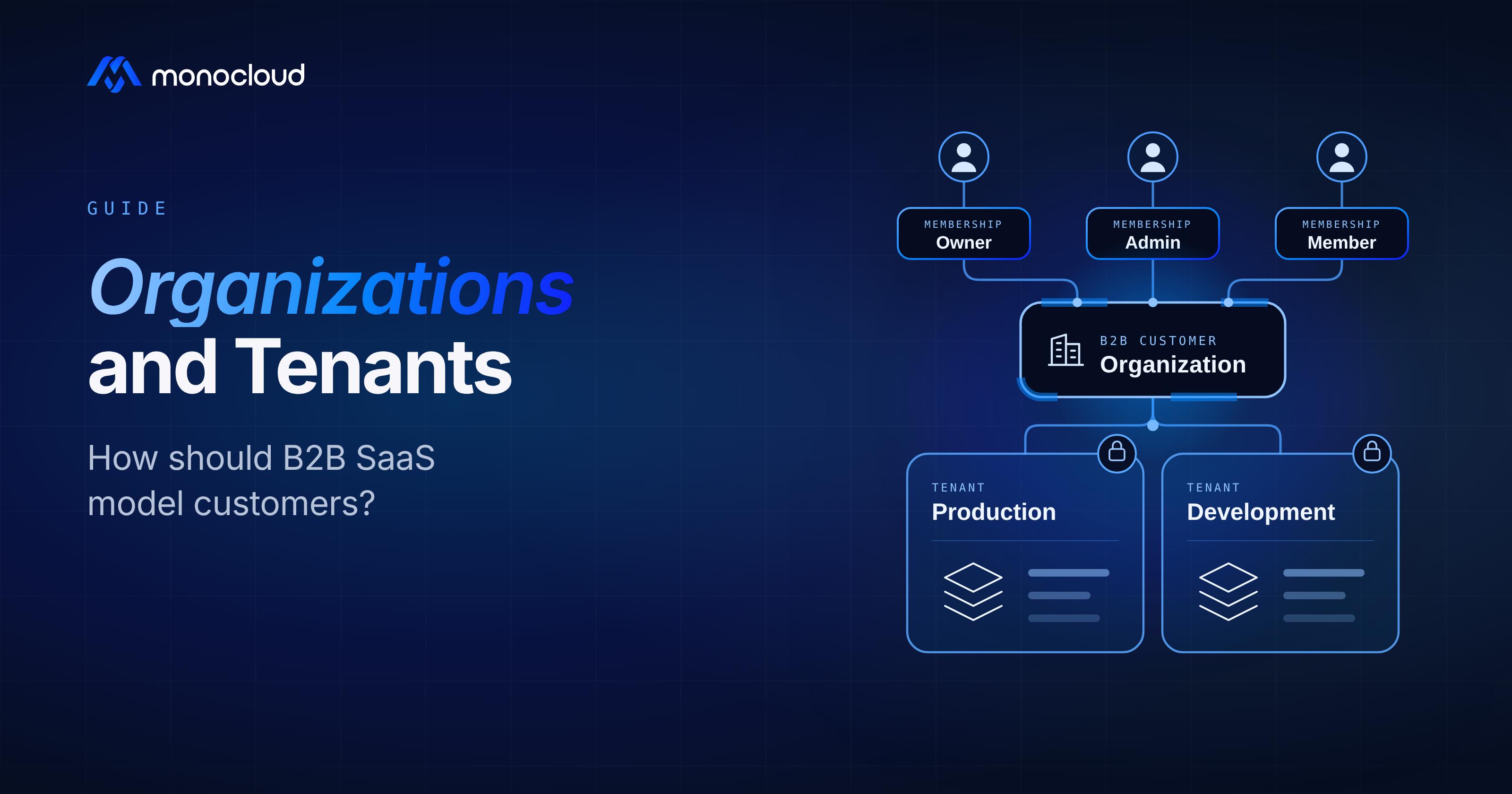
Although organizations and tenants are closely related, they are not always interchangeable. Some applications maintain a one-to-one relationship between them, while others may associate multiple tenants with one organization. For example, a large enterprise might maintain separate tenant environments for its production and development operations while managing them under a single organization.
2. Understanding Memberships and Roles
Once an organization is created, employees need to be added to it. This relationship is managed through memberships, which connect an individual user account to an organization and define the user's role within it.
For example, a company might have users with different roles:
- Owner: Manages the organization and its administrative settings.
- Admin: Manages employees, invitations and permissions.
- Member: Uses the application's features and resources.
An important distinction is that a role belongs to a user's membership in an organization, rather than being permanently assigned to their account. A consultant working with two companies, for instance, could be an Admin in one organization and a Member in another. Their permissions depend on the organization they are accessing.
Memberships also provide a foundation for more granular access management. Groups, for example, can simplify administration by allowing permissions to be assigned to collections of users rather than configuring each employee individually.
3. Scaling Up: B2B User Management
As businesses grow, manually managing employee access becomes difficult. Enterprises expect administrators to control who joins their organization, how employees authenticate and what resources they can access.
A well-designed customer model makes these requirements easier to support:
- User Onboarding and Invitations: Organization administrators can invite employees and associate them with the correct organization through memberships.
- Role-Based Access Control (RBAC): Organization-specific roles determine what users can manage and access within each organization.
- Groups and Permissions: Employees can be organized into groups, allowing administrators to manage access collectively. Group memberships and permissions should remain scoped to the appropriate organization.
- Single Sign-On (SSO): Organizations can connect their existing identity providers (IdPs), such as Microsoft Entra ID or Okta. The application must associate each SSO configuration with the correct organization so employees authenticate through their company's designated login system.
- Automated User Provisioning (SCIM): System for Cross-domain Identity Management (SCIM) allows an organization's identity directory to synchronize employee accounts and group memberships with the SaaS application. Provisioning and deprovisioning must update the corresponding organization memberships and access rights.
- Administrative Controls and Audit Logs: Organization administrators need control over employees, permissions and identity configurations. Audit logs help track important activities, such as membership changes and administrative actions.
An identity platform such as MonoCloud can support authentication, user identity management and enterprise identity integrations, depending on the capabilities being used. However, these responsibilities are distinct from application authorization and data isolation. The identity platform helps establish who the user is, while the SaaS application decides what they can access and enforces the appropriate tenant-level data boundaries.
These capabilities are not independent features. They rely on a customer model that correctly represents organizations, users, memberships and their relationships.
4. How Should B2B SaaS Applications Model Their Customers?
A practical approach treats the organization as the customer, the tenant as its data-isolation boundary and memberships as the link between users and organizations. Each layer has a distinct responsibility, helping developers manage customer identity, data separation and user access without combining everything into a single structure. The mistake worth avoiding is treating the organization and the tenant as the same object. That holds up until a customer needs two environments under one account, and then a model that fused them has to be pulled apart.
Consider BrightTech. When the company signs up for the project management platform, it gets its own organization and an associated tenant environment that keeps its data separate from other customers. Employees join through memberships, and the roles attached to those memberships determine what each person can manage and access.
As BrightTech grows, administrators can invite new employees, connect the company's identity provider for SSO, and synchronize employee accounts and groups through SCIM. Changes to memberships, roles and group assignments can then update the appropriate access permissions. This allows the company to manage its employees centrally without creating a separate organization for every department.
Show Image
By keeping these responsibilities distinct, developers can support multiple customers on the same SaaS platform while maintaining tenant isolation and consistent access controls. The exact approach will depend on the application's architecture and security requirements, but establishing these relationships early makes it easier to introduce enterprise integrations and accommodate organizational growth.
Getting the Structure Right
Building an enterprise-ready B2B SaaS application requires more than adding authentication or bolting on enterprise features one requirement at a time. It starts with a well-designed customer model that connects organizations, tenants and memberships in a consistent way.
Getting this architecture right from the beginning provides the foundation for managing organizational structures, user relationships, application authorization, data isolation and enterprise identity integrations. It also allows capabilities such as SSO, SCIM and centralized administration to work together as the application scales. By considering these requirements early, developers can build applications that are easier to manage, secure and adapt to evolving enterprise needs.
An identity platform like MonoCloud provides the organization, membership, SSO and SCIM building blocks, so you can model customers this way without building the identity layer yourself. To get started, read the MonoCloud docs or create a free account.
Frequently asked questions
What is the difference between an organization and a tenant?
An organization is the business that uses the application, the customer identity that brings a company's employees and administrators together, answering "who is the customer." A tenant is that customer's isolated environment inside the application, where its data and resources are kept separate from every other customer, answering "where does the customer's data live and how is it isolated." They are closely related but not always one-to-one: a single organization can have more than one tenant.
What is a membership in B2B SaaS?
A membership connects an individual user account to an organization and defines that user's role within it. Roles belong to the membership, not to the account, so the same person can be an Admin in one organization and a Member in another, and their permissions depend on which organization they are acting in. Memberships are also where group-based access is scoped.
What is tenant isolation?
Tenant isolation is the boundary that keeps one customer's data and resources unreachable from another customer's. It is what lets many businesses run on the same SaaS platform without ever seeing each other's information. Isolation is enforced by the application at the data layer; the identity platform establishes who the user is, but the application decides what they can access and keeps the tenant boundaries in place.
Can one organization have multiple tenants?
Yes. Some applications keep a one-to-one relationship between an organization and a tenant, while others map several tenants to a single organization. A common case is a large enterprise that runs separate production and development environments as distinct tenants while managing them under one organization and one customer identity.
How should a B2B SaaS application model its customers?
Treat the organization as the customer, the tenant as its data-isolation boundary, and memberships as the link between users and organizations. Keeping those three responsibilities distinct lets you manage customer identity, data separation, and user access without fusing everything into one structure, and it makes enterprise features like SSO, SCIM, and centralized administration easier to add as you scale.